Wuff

Monday, April 7, 2008

computers: old storage media

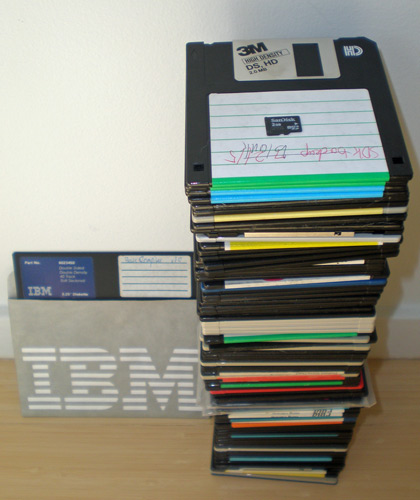
Remember 3.5" floppies? Here are 90 of them, free for the taking.
90 3.5" floppies plus a 5.25" floppy and a 2GB microSD card
Ignore the “2.0 MB” label, these actually store about 1.44 MB. So that stack represents all of 132 MB, or less than a fifth of a CD-ROM. I remember when these first came out for the Mac and cost $10 each.

Those floppies are junk, you can't even give them away. I consolidated the information from them to a few MB on a network drive. Many were backup and transit disks (so-called "sneakernet") with only slight differences between directories and files. I couldn't find a good tool to help me consolidate them. I wanted a split view explorer that would show floppy details (including bootable or not, DOS version, hidden files, etc.) in one pane and in the other pane intelligently search a hard drive for likely matching files and directories. Probably a DOS version of such a tool was on one of the floppies!

Several of them are installation disks for nifty integrated phone answering machine +FAX software like Ring Zero and QuickLink that came with modems. Back then the mental stumbling block was “Your computer can be your telephone,” just as now the stumbling block is “Your computer can be your TV.”

The disk in the IBM sleeve on the left is a 5.25" floppy from 1983 or so that stores 360KB. I have several dozen of those I still need to archive. I also have an 8" floppy with some documents I made on an IBM Displaywriter, plus a 3.5" magneto-optical disk, a Jaz disk, and a Sun 1/4-inch cartridge. Compared with the 80s and 90s, we are in a period of incredible media stability.

Labels: ,

computers: relentless storage progress

Here's the picture from my old storage media post.
90 3.5" floppies plus a 5.25" floppy and a 2GB microSD card
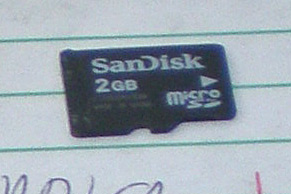
That speck on top is a 2GB microSD memory card for my phone.

close-up of 2GB microSD cardIt holds 1,360 of these floppies, or a stack 15 times taller (4.5 meters—14 feet tall!). Or 5,555 times more than the 5.25" “IBM” floppy in the picture.

When you just switch letter prefixes around you lose sight that 2 gigabytes is an insane number. It's roughly 2000× a megabyte, 2000000× a kilobyte. 2,000,000,000 characters! If you write pure ASCII text, you could never, ever fill it up. But of course the computer industry finds a way to inflate simple sequences of letters. The text of my post on old floppies was only 1,647 characters; Blogger turned into a 16,000 byte web page; it's 100,000 bytes including the two images; it would have been 4,200,000 bytes if I had used the original photos instead of resizing them for the Web. If I had made this a presentation in evil Microsoft PowerPoint it could easily be 1,000,000 bytes. If I had made a video zooming in from the pile of floppies to show just the memory card, it would have hit 100,000,000 bytes. But it wouldn't be 10,000 times more information.

Labels: ,

Monday, November 12, 2007

computers: Gave one, getting one OLPC

The OLPC Give one get one site went live, so I forked over my $400. According to the inspiring OLPC weekly news, mass production has started. I should get my XO in December.

The anti-fan boys who want this project to fail are so depressing, because they're busy telling other people what to do with their charitable impulses while sitting on their asses typing negative statements, doing f***-all themselves. So listen up, anti-fan boys, responding to some of of your negative points:
  • “third-world kids need food and shelter”
    True for some kids in crisis, so leave this site right now and go to CARE or the Red Cross and give them your $200. But if you weren't so patronizingly unaware, you'd realize there are hundreds of millions of children who have food and shelter but poor education and little opportunity for advancement.
  • “they should focus on seed programs/health/clean water/whatever”
    It's not a zero-sum game. Some talented computer engineers are applying their skills to developing a free and open-source learning computer. If you dicks waved your magic wand and shut this project down, their talents wouldn't magically breed super crops or cure malaria. Meanwhile, where are you applying your limited talents?
  • “kids need to learn the standard platform, i.e. Windows, so all this engineering effort is a waste”
    Go volunteer to teach MS Windows and MS Office computer skills to the poor in your area. Meanwhile, let this project deliver to grade school children a software and hardware platform optimized for learning, and we'll all see what happens. The geeked-out hardware and software efforts have already inspired the development of lots of open source courseware and learning materials.

Labels: ,

Friday, September 28, 2007

computers: Thinkpad dock, applications, Norton

The new Thinkpad T61 laptop computer for my domestic partner other significant arrived. It's quiet and well-designed.

Its dock is great. Unlike port replicators that require drivers to route signals, the Thinkpad actually brings out the wires, so it's purely hardware and the external video can run at high resolution. Push a button, turn a key and the keyboard, mouse, monitor, printer, microphone, speakers, and Ethernet on the desk all connect/disconnect when you dock/undock.

Getting Vista to cooperate with my network and other computers was so awful that I blogged it separately.

I copied over my Dreamweaver and Fireworks applications and pasted in their registry settings, but they complain about missing libraries and fail to export files. The applications that migrated flawlessly were Mozilla SeaMonkey e-mail+browser and Bitpim phone sync, both open source. Simply download the latest version of the app, install it on the new computer, and copy over one data directory. All the effort commercial software companies waste on license checking, registry keys, and serial numbers doesn't add any value to their product and makes it hard to migrate.

The Norton Internet Security that Lenovo provided fought me all the way. Its firewall rules allows "local" file sharing, but its idea of "local" is to hardcode some common private network addresses that routers use by default (192.168.1, 192.168.11, etc.). However I had set my router to a non-standard network address for compatibility with work. Is Norton smart enough to determine or ask you what your local network's address is? Is Norton's configuration able to label an address range as "my home network" so you can reuse it in rules without having to manually change every single one? Will Norton prompt you when its general rules block Windows operations? No, no, damn you Symantec, NO! Networking just fails and you waste hours checking cabling and routers and other computers.

Lenovo has some additions to Vista that just confuse things. Their network security lets you enable/disable "Windows firewall", but it seems Norton Internet Security's firewall runs anyway. They have a network places manager, but it mostly confuses things with another network icon in the system tray. They have a Thinkvantage security center that keeps starting up, with its own upgrade service that didn't work.

Likewise, Intel graphics adds its own monitor control. So there's the Thinkvantage software to choose a layout when you plug in an external monitor, Intel's software to set up your graphics, and Vista's display appearance control panel. They're all covering the same ground! Yet their help explains their relationship to the other competing software.

If this were Linux open source, Intel and Lenovo would modify and extend Microsoft's O.S. code for network management and multiple monitors, they wouldn't have to reinvent it. Any improvements or bug fixes they make would show up in the core software, benefiting everyone.

Labels: , , ,

computers: a Vista of pain

I'm sure Microsoft Windows Vista is OK if you have no other equipment, or if everything else you have is less than three years old. Getting Vista to work on my mixed network and with my existing software has been awful:
  • gratuitous DHCP incompatibility with older routers
  • switch to Link-Layer Topology Discovery broke Network Neighborhood
  • Windows XP can't see printer attached to Vista.
  • stupid incompatibility with NTLM v1 authentication broke file sharing with NAS and XP
  • older USB drivers won't install
  • HP scanner incompatible (a $40 third-party driver is available)
  • Office 2000 mail merge broken
  • Windows Address Book change breaks Outlook 2000
There are hacks and registry settings and workarounds for most of this, but it was a miserable four day slog and I seriously considered demanding a downgrade from Lenovo. However, Microsoft will drop XP eventually so you suffer the upgrade incompatibility pain now or suffer it later.

Other software and hardware vendors go along with the gratuitous incompatibilities Vista introduces, because its their chance to sell new hardware and software. Gratuitous obsolescence hurts consumers but companies love it.

Compared with XP, Vista is slow to boot and slow to go in/out of standby. The Thinkpad has 2GB of memory and a fast drive and doesn't seem to have a lot of crapware on it, so I blame the O.S.

So far the only nice thing about Vista is its additional metadata fields. A view of a folder full of images can track the date taken and camera details and has tags and star ratings, so you don't need an image manager like Canon's ZoomBrowser. The Aero "show windows" feature is way less functional than Mac OS X's Expose.

I should have upgraded to a Linux distro.

Labels: ,

Wednesday, September 19, 2007

computers: saying NO to the Office tax with Google Docs

There have always been free alternatives to Microsoft's huge bloated expensive Office suite, particularly OpenOffice.org.

I don't use them because apart from programming in Eclipse I create my documents on the Web (like this one). If I need to send out a paper letter, I use Wordpad.exe.

So what do you do if someone sends you an Office document as an attachment? Wordpad will sort-of open a Microsoft Word .doc file, but an Excel .xls or PowerPoint .pps/.ppt is meaningless. Of course, no one should be sending attachments, since as Scott McNealy, CEO of Sun Microsystems, said in Upside magazine 10 years ago:
I'm trying to ban e-mail attachments. I just want an ASCII e-mail.
If you want to show me something, put it in a Web page, publish it,
give me the URL, and I'll look at it. That's the new model.
You can't stop others from sending you Office files, so most people give up and buy a copy of Office.

Enter another killer free service on the Web from Google, Google Docs. You can upload any of those file formats to it, or you can create a document/spreadsheet/presentation from scratch. More importantly, you can publish any file in Google Docs to the Web so other people can view it, comment on it, or even collaborate on it from their browser. The file format becomes irrelevant. No more sending a document back and forth in e-mail with lots of comments.

Next time you think you need to send an Office document to other people, put it on docs.google.com or create it from scratch there, and send them the link.

Just as YouTube is slowly but surely killing off the inefficient approach of e-mailing huge video files to share with friends, Google Docs should kill off e-mailing large jokey PowerPoint slide shows around. As a demo, here's a slightly naughty PowerPoint joke thing I received as an attachment, now on the Web at http://docs.google.com/Present?docid=dcvvrqtp_6c3vccz&fs=true.

I know it's hard to believe, so I'll repeat it:
You DON'T need Microsoft Office on your computer
Donate the $200 to charity.

Update There are other free Web-based applications besides Google Docs. Here's the same PowerPoint presentation in Zoho's "Show" app: http://show.zoho.com/public/skierpage/Oneofthosedays.pps

Labels: , ,

Tuesday, September 11, 2007

computers: love the one your with

The computer industry has created the meme "Computers get slow and gunky after 20 months or so". I know lots of people who buy a new laptop every year or two because, well, that's just the way it is.

Of course that's completely untrue. Run anti-virus, uninstall programs you're not using, run a spyware remover, disable startup programs and services that don't seem to be important (note how these tasks are progressively harder for the average user) and your computer should work for years. I ran a Macintosh 128 with the "kitchen-table memory upgrade" for a decade.

After 8 years, we're replacing a Pentium III 500 Mhz desktop machine.
  • It needed more disk space. 10GB just isn't compatible with today's mega-bloated programs.
  • Contacts search in Outlook 2000 started mysteriously crashing and nothing fixes it.
  • Although the key program SeaMonkey (the latest iteration of the Netscape all-in-one browser and e-mail) works perfectly, lots of utilities and new versions didn't run well on Windows 98 SE, e.g. Photoshop Elements.
  • Network sharing and printing between Windows 98 SE and XP is slow and unreliable.
  • Most importantly, Windows 98 SE isn't getting updates and patches. Most security vulnerabilities are in the browser but occasionally the bad guys find holes in the operating system.
I could have performed surgery to address all of these, starting with the hard drive, but when you're that many generations behind, the software/hardware/documentation to upgrade your old computer is itself out-of-date and unsupported.

So an IBMLenovo Thinkpad T61 with ultra mini-dock is on the way. The hard decision was whether to go with Windows XP or Vista Home Premium. Cnet's laptop buying guide recommended Vista Home Premium. We'll see...

Labels: ,

Wednesday, November 15, 2006

computer: One Laptop Per Child going gangbusters

OLPC news looks good. B1 prototypes! Supposedly the learning community responded well to this keynote. Paper textbook publishers and people with ties to Microsoft/Intel are going to go even heavier into politics and FUD mode to bring this down.

By designing everything from the ASICs to the apps in an open concerted manner, they're optimizing and improving the entire system on an hourly basis, in a way that a Wintel laptop can only dream about. (In contrast, here's a long sad post from a Microsoft engineer about the hassles and crapware of a typical Windows PC.) Even though I'll probably never own one, much of the improvements in software will flow to LinuxBIOS, Linux, X windows, and other open source projects.

And I find another super-talented long-timer is working on it, Mitch Bradley of Sun, Forth, PROM fame.

Labels: ,