music: Little Feat’s Waiting for Columbus

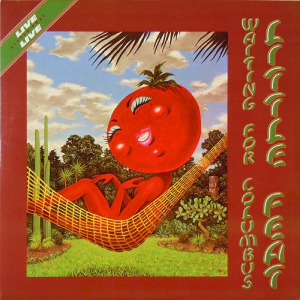
Waiting for Columbus album coverI had this live double album and sold it because I wasn’t that big a fan. But I heard a friend’s copy and had to buy it again. “All That You Dream” has one of the greatest intros ever (video of another live version, not as crisp). Bill Payne’s synthesizer lines (ARP Oberheim, I assume) on “Time Loves a Hero”-“Day or Night”, though they sound dated, sear and soar. Another great pair of songs is “Tripe Face Boogie” and “Oh Atlanta” There’s tension between the down-home Southern boogie, New Orleans sophisticated funky vibe, jazz-rock jams (Lowell George left soon after over the usual “musical differences”) but out of that tension between the musicians came some phenomenal music.
Reading about the album and band on Wikipedia makes me appreciate it even more

  • it is considered by many rock music critics to be one of the best live albums of all time, even though significant portions of George’s vocals and slide work were over-dubbed later in the studio.
  • Little Feat were the backing band for Robert Palmer‘s album Pressure Drop, which featured his cover version of Lowell’s song “Trouble.”

Ahh, when live albums captured bands at their peak, with the mobile truck rolled up and months spent remixing and re-recording to perfect the presentation. Besides this, I have some other greats: Frampton Comes Alive, Welcome Back My Friends… (ELP), and Yessongs. Now most concert DVDs are a cheaply-made capture off the PA board, at best a slightly embarrassing memento.

Posted in music | Leave a comment

music: Led Zeppelin, conscious bloat versus generosity

This funny moment-by-moment review of a single Led Zeppelin song in concert nails the problem people have with them: “conscious bloat”.

But one man’s bloat is another’s inspired riffing. You could just as well label all dance music = mindless repetition, but if the groove is good, why not stay there? The genre I find most tiresome is jazz-rock noodling, exemplified by Traffic and other early 70s bands. If you enjoy real jazz improvisation, it’s hard to stomach. It’s expertly parodied by Derek Small’s Jazz Oddyssey that the band finally get to play in “This Is Spın̈al Tap.”[**]

That’s why I still enjoy and admire Yes. All five band members have compositional skills and insane musical chops, so they cram a ton of stuff in to every “song”, which to abuse and cheapen the language of classical music is really a collection of overture, movements, and interludes. If you don’t like the current musical phrase, it mutates or a brand new one comes along, literally every few bars. (Though even they’re not immune, I sat through a turgid Chris Squire bass solo in which he wanked away on “Amazing Grace” to little point.)

The punks had the answer to the problem of bloat: shorter songs! I’m sure there’s a cultural explanation of 1970s lonnnnnnggg songs, a combination of drugs, laziness, the contrast between pop ephemera on AM radio and real extended rock on FM, and the compulsion to do something different to escape the vast overhanging shadow of the Beatles.

The 2010 New Yorker profile of Elvis Costello digs up his classic put-down: “I am really grossly offended by Led Zeppelin,” he said in 1986. “Not only because they’re total charlatans and thieves, but because it actually embarrasses me.” OK but that doesn’t stop II and IV and parts of everything else being fantastic. (After reading that I pulled my albums off the shelf and listened through them all just to verify.) If Elvis can’t hear the majestic punch of the music, well it just explains why the production of his own songs is so hit-and-miss, and often sub-par.

[**] To full appreciate “This Is Spın̈al Tap” you have to sit through Zep’s “The Song Remains the Same”, “Yessongs”, the ELP tour video, and more. It should come as a boxed set with its genetic source material.

Posted in music | Leave a comment

design: the classic Braun watch and similar

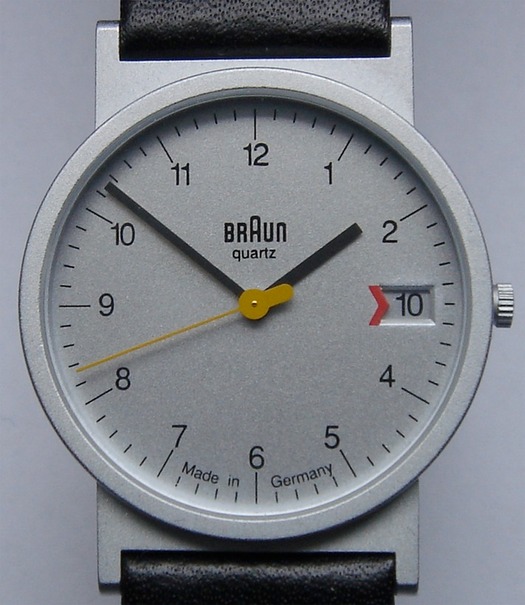
The Guardian had a special offer on a handsome Mondaine watch, which reminded me of the watch I wear, which led me to a design article about it and some weird new Braun watches.

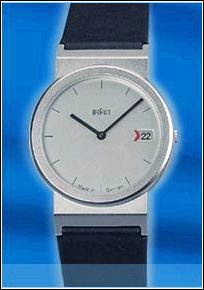
The AW was designed by Dietrich Lubs in the almighty Dieter RamsBraun design studio, I think in 1989. It’s a beautifully restrained simple design: the watch face is quite small, and the brushed finish is fantastic. It’s not completely minimalist, the touches of Bauhaus red and yellow bring it to life. My AW20 CS model from 1990 shown above is the consummate form, but Braun came up with dozens of variations: black face, chrome/black rim, dateless, Bauhaus blue/red straps, no hour numbers, platinum finish, etc. The last is the AW50 P, lovely but different in its details.
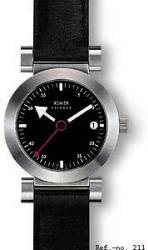
The watches were available from lots of museum stores and design catalogs in the USA, but availability dwindled and sadly I’ve not seen one for sale in stores for years. They are reasonably priced; I think Braun gave some away with their top of the line shaver. I ordered mine from timedesign.de . The watch is durable, but in case it is discontinued I ordered a spare, plus an AW50 P that I’ve never removed from its box. I also ordered a bunch of spare straps because the smooth band of leather eventually disintegrates at the clasp. My first order never arrived— some postal employee in the delivery chain has a couple of nice wristwatches ☹—but to their credit TimeDesign resent the order.

There are similar designs. Ruedi Külling designed the clean Xemex Offroad classic design for a lot more money in 1996, but Xemex seems to have moved on to chunky chronometer crap.
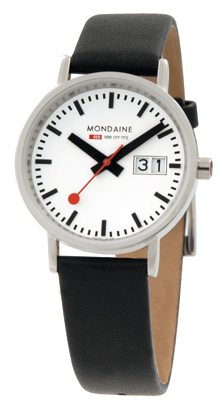
And Mondaine the “Official Swiss Railways Watch” (as opposed to Victorinox the “official Swiss Army watch”) took Hans Hilfiker’s 1944 Swiss railway station clock and put it on a strap in 1986, e.g. their A669.30008.16SBO model. The Braun is the Futura of watches, the Mondaine is the Helvetica.
Posted in design | 5 Comments

design: irrational fear of handles

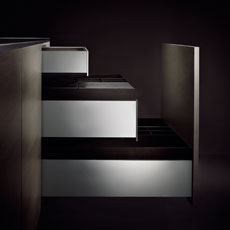
Our kitchen is full of drawers, thus a handsome grid of handles.  Even as we installed it, the trend in modern kitchen design moved on to eliminate the handles altogether, as if you open drawers in your alien autopsy lab using psi powers.

The P′7340 range from Poggenpohl Luxusküchen and Porsche Design is an example of this extreme, and you can see how non-functional it is. Before you open a drawer, you have to open another drawer that has the huge front panel.  And if you want to use that bottom drawer, there’s a tall panel blocking access.

Posted in design | Leave a comment

software: how Live CDs can close the deal

I tried out the some new operating systems by booting them off a USB flash drive, including Fedora 15. Fedora 15 seemed to work fine on my hardware and looked promising, but it wasn’t dramatically better in a few fumbling hours of use and I couldn’t tell from the live USB environment if it would consume less resources with my default apps, so in the end I didn’t install it (and didn’t follow up filing bugs for the issues I found). Instead I stuck with Kubuntu (the KDE “Plasma” desktop UI on Ubuntu). I took the upgrade to 11.04, for KDE this was a minor no-surprises upgrade., Instead I stuck with Kubuntu (the KDE “Plasma” desktop UI on Ubuntu). I took the upgrade to 11.04, for KDE this was a minor no-surprises upgrade.

Live CDs/Live USBs have an undeniable “gee whiz” factor: I reboot my computer and without installing anything or changing my system it’s running a different operating system! But if the Linux distributions providing these Live CDs/Live USBs want to close the deal and actually convince users to install them, they need to reassure users that everything will work and sell them on it being dramatically better. That means they need to do things like:

  • Scan your hard drive partitions, detect which ones are Windows/other UNIX-like, mount them so you can see them from the Live environment, and create symlinks to “Your old documents”, “Your old downloads”, etc. in the live environment.
  • Have some sample audio and images so their music player, photo gallery, and sound and image editing programs have something to work on (and incorporate the existing media from your current hard drive).
  • Provide copies of and links to the “Welcome New User” guidebook and release notes for new release.
  • Configure and demonstrate their next-generation OS features. The system-wide desktop search or semantic knowledge acquisition or time-based journal whatever needs to put up a dialog saying “Reading the sample documents (and existing media from your hard drive), … now open Nepomuk/Strigi / Tracker / Zeitgeist.
  • Determine the applications you’re currently using by inspecting your current “Start” menu and desktop shortcuts and by scanning your current hard drive, and , and suggest which ones are already available in the Live environment, which have alternatives you can install in the distribution, which applications handle the same file formats, etc.
Posted in computers, software | Leave a comment

art: Deborah Butterfield K.O.s AbEx at ART MRKT

It was interesting to go to ART MRKT and see the work that high-end galleries and organizations pay to present. I couldn’t discern any theme to it all. One gallery was hawking Damien Hirst prints, such as a 2-D diamond-dusted print of his £50 million diamond-encrusted skull For the Love of God; the faint echo of a self-referential over-the-top critique of life and art is so powerless it insults the purchaser. Others were showing lesser works by California artists Diebenkorn, Jess, etc.

I couldn’t tell if canvases daubed with splotches were from 1950 or 2010. That feels strange for the quintessentially “modern” form of Abstract Expressionism.

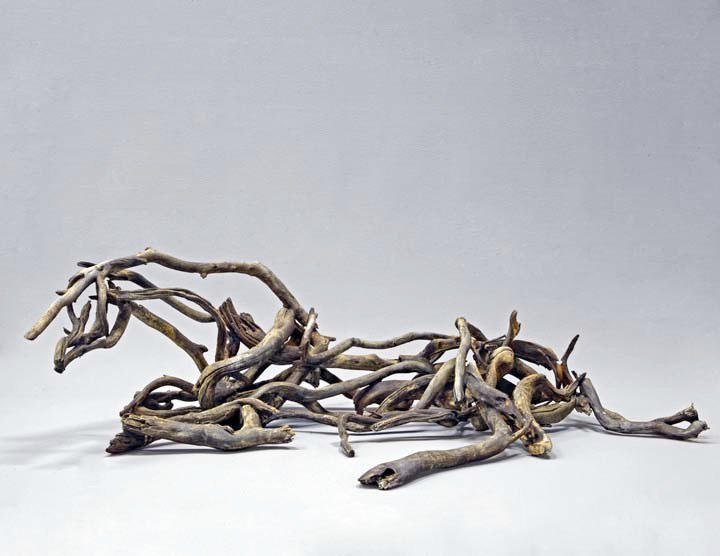
Deborah Butterfield’s recumbent horse was astounding. Unlike her iconic upright horses that just amaze you with the horseness, the gentle whorl of bronze branches pulls you in before confirming it’s a horse. It’s one of the best small sculptures I’ve ever seen.

Kamoe, 2009 bronze 17” x 58” x 36”

Kamoe, 2009 bronze 17” x 58” x 36”

Kamoe, 2009 bronze 17” x 58” x 36” Gallery Paule Anglim

UNDER CONSTRUCTION Other good stuff: Staprans colored still life like Degas but with colored edges, comically bad Kneeling Archer Bart in Chinese style, Chris Dorosz drips on acrylic rods forming tech sculptures, Patrick Hughes inverted perspective of painted rooms folded backward, Nemo Gould’s boxed dioramas.

Posted in art | Leave a comment

books: sex and science-fiction

Three S.F. books, all going way beyond impersonal characterless scientists in lab coats.

Sprawling, very good!

cover of 'River of Gods'

★★★★☆ This does a fantastic job of presenting the foreign culture of Indian nation-states on the brink of cataclysmic changes, while marrying it to big science fiction ideas. It’s got the Gibson approach of jumping between various characters that slowly converge, but with 12 or so plot-lines going instead of three or four. A few of the plot lines are packed with explicit sex, others with violence, one with trans-post-sexual body surgery, another with the weary detective. It’s so genre-inclusive as to be tiring. It covers the discovery of limitless energy but that’s a sideshow to the tale of a bizarre alien artifact predicting a new form of humanity that combines Arthur Clarke Rendezvous with Rama and Gibson’s idea of A.I.s taking the future into their own hands. It’s all good stuff, nearly great. Its main flaw is that considered together, the many cinematic action sequences are implausible: gigantic mechanized bots can appear out of nowhere and destroy cars, but when it suits the plot a plucky heroine gets to repeatedly escape bad guys in the nick of time on a hydrogen-powered putt-putt scooter. Make up your mind!


Hippie freakout

cover of 'The Ware Tetralogy'

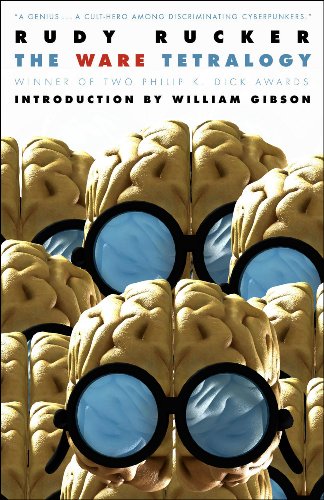
★★★☆☆I finally got around to reading the series, the price is right in combining his four novels Software (1982), Wetware (1988), Freeware (1997), and Realware (2000). It’s downright freaky. Way too many aging hippies with greasy hair having sex, then he introduces the ridiculously implausible idea of “merge”, wherein two people become undifferentiated goo during the sex act, yet given a few minutes can separate and reform. For a time in book two it trots along well with one lone robot survivor on earth. And there’s a nice appeal how the characters from interlocking family trees recur over decades. But the first book’s innovation of a stored program of human (portrayed without any of the sly class of Dixie Flatline the ROM construct in Gibson’s Neuromancer) make death inconsequential, and the technological progress beyond that in the series leads to inventions so wondrous (a “moldie” biological robot can morph to form a shell around a person and fly them to and from the moon) that there’s almost no dramatic tension. Any one of the books ought to be a technological singularity, yet humanity continues on through them with the drugs and bad hair, and outside the big ideas the dull unchanging normality of humanity (drugs, motels, flip-flops, cars) is strangely unimaginative. Rucker’s just reciting one way a future pans out and the only advances that happen are the ones he focuses on.


Sweet but unambitious

Cover of 'Zero History'

★★★☆☆ The former master of hard-edged intricate plotting and mind-bendingly clever future projection continues to idle with another present-day travel novel with mildly interesting observations on current trends (no-label fashion, base jumping, biomorphic remote control zeppelins, whatever). The whole book climaxes in a park intercept that’s the rough equivalent of the Maas Biolabs extraction in the almighty Count Zero; but that book gets the build-up and operation done in just 50 pages and follows with buckets more action and ideas. It’s faintly embarrassing that Gibson parlays his moderately high lifestyle (a private London hotel, fashion week in Paris) into pages and pages of detailed description of the same. Bring back nihilist misfits and underdogs chafing against this self-satisfied society! Several characters from Spook Country (2007) reappear, including the usual plucky solo heroine making sense of things. Finally someone gets to have sex, and Gibson is oddly decorous and romantic in his flat narrative voice. It’s sweet and well-written, but it attempts so little.


These hReviews brought to you by the hReview Creator.

Posted in books | Leave a comment

skiing: an advanced lesson with the master

It’s hard to get better by skiing on your own. Teaching less talented skiers hones your technique, but doesn’t stretch you. So I paid for a private lesson. I’ve wanted a lesson from Elianne “El” Furtney for a decade, but she’s risen way past Level 3 ski instructor and is somewhere up around clinician / district examiner / regional demo team — she teaches the teachers who train ski instructors who teach the common folk. But relaxed ace Tim Reeve, with multiple appearances in Ski Magazine’s “Top 100 instructors in the USA” list, was available.

He mainly focused on my feet. The three parts of a turn are initiation, control phase, and finish, and you use three corresponding parts of your foot: you move onto the toe of your new outside leg to initiate, then ride the arch in the control phase, and finish with your weight towards the heel. In steeps it’s a quick swing from new toe to heel, with very little time spent riding the arch (unless you want to reach mach 3!), but in moderate bumps and easier terrain it’s a long smooth count along your foot. Working from the feet lets you control turn shape; Tim says he visualizes a black curve down the hill and follows it with his feet.  I came into the lesson worrying about my upper body position and my left foot railing to the outside thereby blowing the turn; just trying to draw half-circles with my feet made those problems go away! Ding ding, $179 well spent. Maybe less-experienced instructors focus on your arms, upper body and hips because it’s easier to see what those body parts are doing.

In steeps, Tim reminded me to have my upper body facing where I’m going. Thus in aggressive fall-line swing turns, face downhill and reach downhill with the pole plant.  I tend to let my skis turn me across the hill, so I need to consciously rotate my upper body opposite to the way my skis turn — “counter-rotation”.  Also in steeps, you shouldn’t initiate turns with a step onto the big toe of the new outside ski because that pops you up and away from your skis and your descent.  Instead it’s a press toe-and-(immediately)-down! motion. I was completely unable to do this and face downhill at the same time.

We talked about riding that outside foot and how hard it is for intermediates. You have to put some juice into it, but if you push it away from your body you lose control and end up straight-legged using your hips to turn the back of the ski. I tell skiers to “stub out the cigarette” or “squish the grape under the ball of your foot”, and try to get them to feel the pinch in the hip, lower the outside hand to “pat the dog”, face downhill as the skis turn: all ways to load up the outside foot while still keeping it on edge. Tim keeps it simple: he tells students there’s a skateboard in the driveway and they need to put a foot on it and steer it through a turn; that model of a turn gets you onto the foot without all the complexity.

Actually propelling my upper body into the next perfectly carved turn like a racer didn’t happen (the same missed goal as a previous lesson — skiing is hard!); Tim says that’s timing.  And it was a slushy warm afternoon so we didn’t get to work on ice; Tim says that’s just adjusting pressure, maybe even retracting skis. ‘It’s called “the touch”,’ he said, mystically. I’ll get there some day.

Posted in skiing | Leave a comment

software: Fedora 15 feedback

The Fedora 15 announcement says

A list of the problems we already know about can be seen on
the Common F15 bugs page,at  http://fedoraproject.org/wiki/Common_F15_bugs.

If you find a bug that's not found on that page, be sure it gets
fixed before release by reporting your discovery at
https://bugzilla.redhat.com/ Thank you!

But there’s nothing on the Common F15 bugs page, and filing a bug for each of these vague comments is impossible. So here’s my brain dump. If I were a well-known reviewer, people passionate about the project would jump in and respond to these, file bugs for some of them, discuss workarounds, etc. Oh well.

Boot/device problems

Running livecd-iso-to-disk from the Fedora ISO on Kubuntu 10.10 seemed to work, but my PC gave me the SYSLINUX boot: prompt. It seems Ubuntu 10.10’s syslinux version 4.01 puts an ldlinux.sys on the USB that doesn’t find syslinux.cfg in a subdirectory. After I repeated syslinux command with latest 4.04, it booted up fine! (I filed Fedora bug 699554)

Brief flash of text console at one point.

Same Pulseaudio problem with audio devices as in Kubuntu: my built-in VIA 8237 audio and Audigy ZS card are both labeled “Internal Audio Analog Stereo”, no distinction.

Terminal

When I’m in the Terminal, its  “icon” background in top menu bar looks like a rendering glitch and/or collection of subtle window system indicators (>_)

The terminal bell sound is wayy! TOO LOUD!!!  It’s much louder than other sounds.

Why no sudo?

liveuser is not in the sudoers file.  This incident will be reported.

Sound Settings control panel

Terminal bell sound is wayy! TOO LOUD!!!
Changing Sound Settings > Sound Effects > Alert volume has no effect on terminal bell volume.

When I choose an alert sound, the first ~0.2s of it repeats endlessly, and Sound Settings locks up.  I have to Force Quit

Sound Settings Output tab should have a [Test] button as KDE does.

UI Toolkit

In GEdit Open Files dialog, it’s wrong that symlinks don’t appear in italics.

In GEdit, how come Ctrl+Tab, Ctrl+PgUp, Ctrl+` don’t switch between tabs?!

Rhythmbox music player

The first time I started it Rhythmbox warned “Cover art plug-in not found (roughly).

It would be so nice if live USBs came with a few sample songs and images!!

Window controls

Bottom bar

When I move the mouse to the lower right, a bar fades in with “Rhythmbox” in it.
If I right-click on this, there’s an Open command.  But:


  • If Rhythmbox is minimized, it doesn’t reappear.
  • If Rhythmbox is under other windows, it doesn’t pop to the top.
  • Basically this doesn’t do anything?

Moving windows

The blue shade for half-screen is nice, but if I move Firefox towards the edge it pops to fill the whole screen, and there’s no indication this is happening.

When a window is half-screen, there’s no indication this is the case, so it’s puzzling there’s no resize cursor on the visible edge.  And there should be a resize cursor, why not let me resize a half-screen window to be 2/3 screen!

Activities

Activities menu item at top left

Click and hold and Right-click do nothing.  This is unlike every other icon in the top menu bar!

Activities screen

Type “IRC”, nothing shows up!  I need an IRC client! Maybe it’s Empathy.
Type “Chat”, Empathy appears.  But there’s no description of it.  The KDE Start menu has the name and a few words of description, and can search on both. That’s much better.

While Activities is up, Alt-Tab to return to a different window doesn’t work.
Can’t use tab or Ctrl-tab to switch between Windows and Applications view.  Are these tabs? They seem to be, so I don’t like Windows and Applications buttons sitting on the desktop.

Activities > Applications list

  • the font is too small
  • the ‘A’ in application names like Add/looks bad, the first stroke is ragged
  • arrow key doesn’t move around list
  • No right-click menu on apps that appear in Applications.

Help

Help > Go > All Documents… where’s the Gnome Shell document?!
Ahh, it’s Desktop help.
The detailed text for Desktop help is… Desktop help. It should be “Guide to Gnome gesktop shell”.

Posted in software | 2 Comments

computers: trying new distributions

I’m still running the Kubuntu flavor of the Ubuntu Linux distribution, now up to version 10.10. It’s lovely that Linux distributions get steadily better for free, and thanks in a small part to my bug reports and testing.  The glitches I had with Ethernet are gone, it better understands my sound cards, etc.

But 1 GB of memory isn’t enough to run a browser. This is hard to believe, so I thought I’d try some other operating systems to see if they have less resource needs. Windows and Mac users don’t realize there are lots of free operating systems out there, and that you can try them out by “simply” downloading a CD-ROM image and burning it to a CD-R or transferring to USB flash drive. Microsoft and Apple’s operating system business depends on you not being able to make your own bootable copy of their operating system, but free open source operating systems want you to do this and share the tools and utilities to make it easy.

Chromium OS

While Android goes from strength to strength, Google is still developing Chrome OS, a lightweight Linux operating system that runs a browser. That’s pretty much what I want. Because it’s open source, you can adapt Chrome OS to work on other computers. That’s what the teen hacker from the UK “Hexxeh” has done, he builds a version of Chromium OS every night.

Bottom line: it didn’t work for me. Either his build doesn’t support my ATI video card, or Chromium OS requires more advanced graphics than my card implements. In theory I could build my own version of Chromium OS, but it’s very complex.

New Linux desktop experiences

The Ubuntu Linux distribution and the Gnome user interface project have both committed to next-generation desktop projects, Unity and Gnome Shell respectively. Much gnashing and wailing about duplicated efforts, lack of code sharing, etc. And when people review the resulting desktops it tends to be superficial “I don’t like it” responses.

Fedora 15

I supported the inspiring vision of One Laptop Per Child vision through its Give One Get One program (I think my given one went to Rwanda), and my XO-1 laptop uses a Fedora spin, so I’m familiar with it and impressed by their work.  So I thought I’d give it a try, and also check out Gnome shell.

I reused the USB flash drive that had the failed Chromium OS build on it. First I had problems with arcane cylinder-head geometry issues when I rebuilt the drive. Then I discovered that although Fedora’s script to make a live USB runs without errors on Kubuntu and ends with "Target device is now set up with a Live image!", it is actually incompatible with the Ubuntu 10.10 system utilities.

With those out of the way I finally booted into the spiffy Gnome desktop, where I’m typing this blog post. And… it’s hard to tell. Maybe Fedora 15 is using less memory. Maybe I’ll like the new, very different, desktop. Meanwhile I have a ton of beta feedback.

Posted in computers, software | Leave a comment